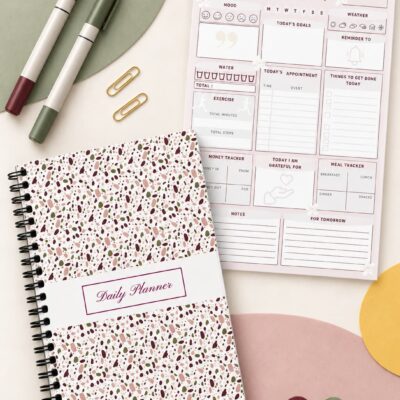
If you keep asking, “Why do I abandon planners when life gets busy?” the problem is probably not a lack of discipline. Most planning systems are created during calm moments, then tested under completely different conditions: late meetings, family needs, low energy, unfinished tasks, and changing priorities.
The practical answer to why do I abandon planners is often that the planner asks for more time, detail, or certainty than the week can provide. The solution is not to fill every box more carefully. It is to create a smaller planning system that still works when your available time and attention shrink.
Start by reducing the planner to three jobs: show what matters this week, identify the next action, and hold information you do not want to remember. Everything else is optional. A planner becomes easier to return to when a missed day does not create a backlog of pages that must be repaired.
Why Planners Don’t Work During Busy Weeks
One reason why planners don’t work is that the planning system quietly becomes larger than the work itself. You copy tasks from one page to another, decorate each spread, assign every available hour, track too many habits, and maintain several separate lists. When the week becomes crowded, maintaining the planner becomes another demanding task—and it is often the first one you stop doing.
Another explanation for why planners don’t work is false capacity. A blank weekly page can make Monday appear spacious even when several hours are already committed to work, transportation, appointments, caregiving, or household responsibilities. When these fixed demands are not visible, the remaining task list is built around time you never actually had.
Busy weeks can also reveal why planners don’t work when the schedule depends on perfect prediction. A carefully organized plan may function until a meeting runs long, an urgent responsibility appears, or a child needs attention. If every task has one fixed time and the schedule contains no room for movement, a single disruption can make the entire page feel unusable.
None of these problems means that planning is pointless. A 2021 meta-analysis of time-management research found moderate relationships between time management and job performance, academic achievement, and well-being. This evidence does not prove that a particular paper planner will produce those outcomes, but it supports a more modest conclusion: organizing time can be useful when the method fits the person and the situation.
Why Do I Abandon Planners Even When I Start Motivated?
Motivation can make a new planner feel easy for several days because setup receives extra attention. The difficulty appears when using the planner must compete with the responsibilities it is supposed to organize. A system that relies on daily enthusiasm is fragile by design.
You may also be using the planner as a record of the ideal week rather than a guide for the real one. When several tasks remain unfinished, the page begins to look like evidence of failure. Avoiding it then provides short-term relief, even though it also removes the overview you need.
The better question is not “How can I force myself to maintain this layout?” Ask, “What is the smallest amount of planning that would still help tomorrow?” This shift separates the useful function of the planner from the optional work of making every page complete.
Research on habit formation also offers helpful perspective. In a real-world study of repeated behaviors, researchers reported that missing one opportunity did not materially affect the habit-formation process. The study concerned health-related behaviors rather than planner use, so it should not be treated as a planner rule. Its practical relevance is narrower: one interruption does not automatically erase a developing routine.
Before buying another planner, test a simpler approach with the free one-month Daily Planner. It gives you enough time to discover which pages genuinely support your routine—without committing to an entire year or trying to change everything at once.
How to Use a Planner Consistently Without Filling Every Page
Learning how to use a planner consistently begins with deciding what consistency means. It does not have to mean writing every morning, completing every tracker, or using every section. A more durable definition is returning often enough that the planner still helps you choose and remember what matters.
Choose one weekly anchor
Pick one moment when you are usually able to look ahead, such as Sunday evening or Monday morning. Use ten minutes to enter fixed commitments, choose a few important outcomes, and identify the first action for each one. If the regular time is missed, use the next available ten minutes rather than waiting for another perfect week.
This is one practical answer to how to use a planner consistently: attach planning to an existing point in the week instead of depending on a fresh burst of motivation. The anchor provides a return point, while the short session keeps the maintenance cost low.
Separate commitments from possibilities
Appointments, deadlines, and tasks that must happen belong in the active weekly view. Ideas, optional errands, and projects for later belong on a separate holding list. Mixing them together makes the current week appear more demanding than it is and hides the few items that truly need attention.
Use a minimum version on low-energy days
Your minimum version might contain only today’s appointment, one necessary task, and one small personal action. That is enough to preserve orientation. You can use the full layout again when your capacity returns, without treating the lighter version as a failed plan.
Realistic Weekly Planning Starts With Available Capacity
Realistic weekly planning begins before you write the task list. Mark the time already claimed by work, transportation, appointments, family responsibilities, meals, and rest. Then plan inside what remains instead of treating every open box as equally usable time.
Next, choose a small number of weekly outcomes. An outcome is clearer than a vague category: “send the revised proposal” is more actionable than “work,” and “schedule the appointment” is more useful than “health.” Each outcome should have a visible next action that can be started without another planning session.
Leave some capacity unassigned. This is not wasted space; it is where delays, recovery, and ordinary interruptions can fit. Realistic weekly planning accepts that a useful plan must be adjustable after the week begins.
A five-minute weekly reset
At the end of the week, cross out anything that is no longer relevant. Move only tasks that still matter, and do not copy every unfinished item automatically. Choose the next week’s priorities from current reality, not from the guilt attached to an older list.
If an item has moved three times, change it before moving it again. Make it smaller, assign a specific time, delegate it, place it on a later list, or remove it. Repeated rollover is information about the task or the plan—not proof that you need more willpower.
How to Start Using a Planner Again After a Break
If you are wondering how to start using a planner again, do not begin by completing the pages you missed. Open to the current week. Write today’s date, the commitments that are still active, and the next three actions that would make the week easier to manage.
Do not reconstruct every forgotten task from memory. Check only the sources that can contain real commitments: your calendar, recent messages, email, school or work systems, and any existing task list. Capture what still requires action and ignore expired items.
A simple if-then plan can make the restart more concrete: “If I finish breakfast on Monday, then I will review my planner for ten minutes.” A meta-analysis of implementation intentions examined plans that specify when, where, and how an intended action will occur and found a positive effect on goal attainment across 94 independent tests. This does not guarantee planner consistency, but it supports making the return cue and action specific.
The key to restarting is to begin from the present, not to repair the past. A planner is a working tool. It does not need a complete historical record unless record-keeping is one of your actual responsibilities.
Change the System Before Deciding Why Planners Don’t Work
Before concluding why planners don’t work for you, run a two-week test with fewer requirements. Use one planner, one weekly review, one short daily check, and no more than three active priorities. Keep reminders that require an alert in your phone; paper and digital tools can work together instead of competing.
During the test, notice where friction appears. Do you avoid opening the planner because it is stored in another room? Does the layout provide too little writing space? Are you tracking information you never use? Does your daily list contain projects instead of actions? Each answer points to a specific adjustment.
When you evaluate planner consistency, measure whether the planner helped you make decisions—not whether the pages look complete. A partially filled page that prevents a missed appointment or clarifies the next action has done useful work.
A Restart-Friendly Planner Setup
A restart-friendly setup should make the current week easy to find and the next action easy to see. Keep frequently used information in predictable places. Limit decorative or tracking elements unless you genuinely enjoy maintaining them and use the information they provide.
For realistic weekly planning, use this compact sequence: add fixed commitments, choose up to three weekly outcomes, break each outcome into one next action, and leave open space. During the week, update only what changed. At the next review, remove or revise tasks that no longer fit.
If you want a physical system that does not require a January start, the Complete Habit Tracker Journal includes undated monthly and weekly planning pages, habit lists, and customizable tracking space. The 101-page, full-color journal is available in paperback, coil-bound, and hardcover formats. Use only the sections that support your current routine; an available field is an option, not an obligation.
A Simple Plan for Your Next Busy Week
Use this simpler approach as a filter rather than another standard to meet. First, enter appointments and deadlines. Second, choose three outcomes. Third, write the next physical action for each. Fourth, reserve some unscheduled capacity. Finally, decide when you will check the page again.
This small setup gives you a practical way to test how to use a planner consistently without redesigning your entire life. If the week changes, edit the plan. If you miss several days, return to today. If a section adds work without helping a decision, stop using that section.
Use the free one-month Daily Planner as a practical reset. Begin with today’s priorities, appointments, and essential tasks, then leave space for plans to change. The goal is not to fill every section perfectly, but to create a daily routine you can realistically continue.
Frequently Asked Questions
Why Do I Abandon Planners After Only a Few Weeks?
The planner may require more maintenance than your busy weeks can support, or the layout may be based on ideal capacity. Reduce the system to fixed commitments, a few priorities, and clear next actions. Test the smaller version before buying or building another complicated system.
How Do I Start Using a Planner Again Without Catching Up?
For anyone asking how to start using a planner again, the cleanest restart is the current date. Review your calendar and active messages, capture only obligations that still matter, and create a short plan for the next few days. Missed pages can remain blank.
Should I Use My Planner Every Day?
Daily use is optional. Some people need a brief daily check, while others work well with one weekly setup and updates only when circumstances change. The useful frequency is the one that keeps information current without making planner maintenance burdensome.
Your Planner Should Be Easy to Return To
The most useful answer to why do I abandon planners is not a judgment about your character. It is a design question: what becomes too difficult when the week becomes crowded? Remove that friction, keep the planning job small, and make the present page your permanent return point.
Ready to try a gentler planning system? Download the free one-month Daily Planner and use it during one ordinary month—including the busy and unpredictable days. At the end of the month, you will know which planning habits are useful enough to carry forward.
You do not need an unbroken streak. You need a system that can absorb missed days, changed plans, and limited energy while still showing what matters next. That is what turns a planner from another obligation into a practical support for everyday decisions.